
Same prompts.
Smaller bills.
Your coding tools stay the same. Switchka routes each prompt to the lowest-cost model that can do the job.
Frontier intelligence
shouldn’t be your default tax.
Three lanes. One smart decision.
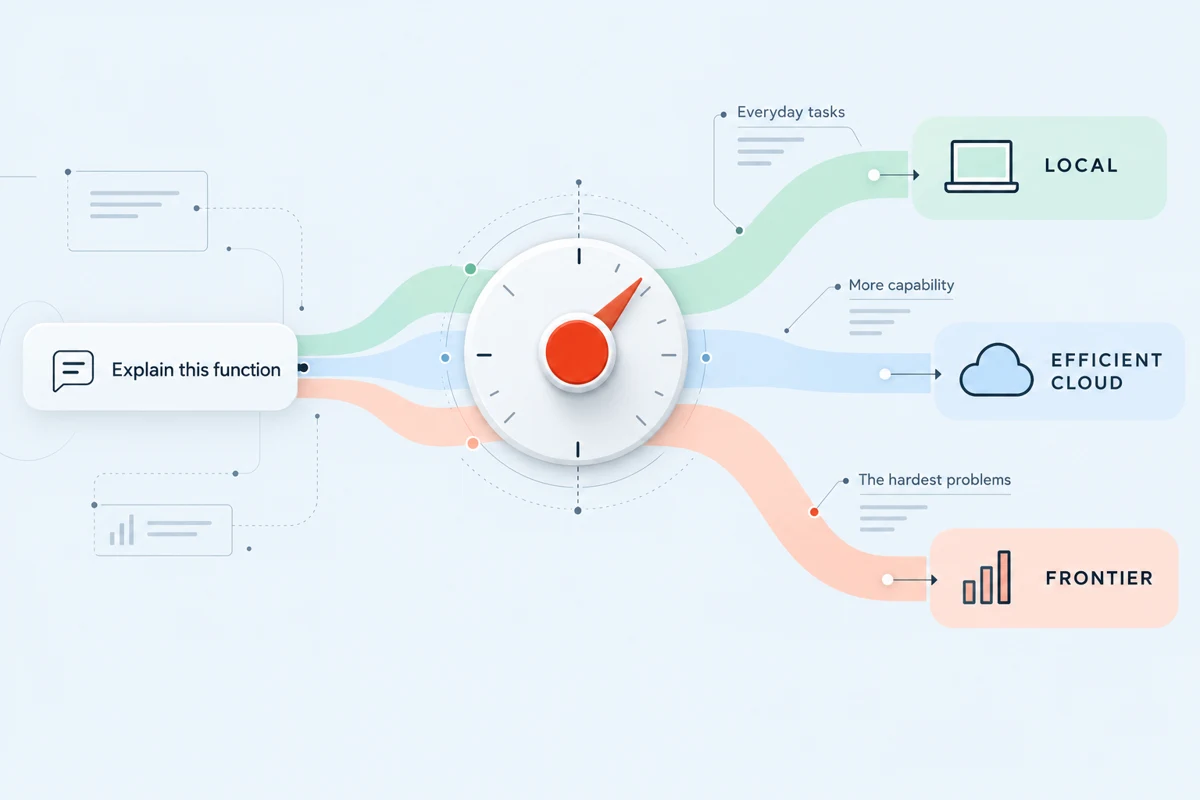
Switchka evaluates each prompt and routes it to the lowest-cost model that can do the job — local first, efficient cloud next, frontier only when needed.

Local
Everyday tasksStart with well-scoped work on your machine, when a suitable local model is available.
Simple tasksstay local

Efficient cloud
More capability. Low cost.Use cost-efficient cloud models for work that needs more capability than the local route.
Bigger tasksmove to cloud

Frontier
Only when neededReserve the most capable tier for problems where deeper reasoning justifies the cost.
Hardest problemsgo to frontier
Illustrative product preview · not live data
See the route behind every request.
A clear view of what happens, which tier is used, and why — so you can understand the tradeoff.
Example requests and values explain the concept. They are not measured results or a promise of available controls.
| Prompt | Routed to | Status | Cost | Time |
|---|---|---|---|---|
| Explain a function | Local | Complete | $0.000 | 0.8s |
| Refactor a module | Efficient cloud | Complete | $0.002 | 2.4s |
| Plan a migration | Frontier | Complete | $0.031 | 6.1s |
Illustrative model mix
One workday.
More than
one route.
The question changes. The capability should, too. Explore three tasks you might meet in the same development session.
Small scope. A sensible place to start.
An explanation of one function may suit a local model when the relevant code is in context. Check the answer against the implementation.
Keep your tools.
Change the economics.
Get the same experience you love, with lower token spend in the background.
- 1Connect your toolStart with Cursor, Claude Code, or Codex.
- 2Let Switchka chooseMatch each prompt to the capability it needs.
- 3Keep buildingReview the work. Keep your workflow.
Start local.
Everyday work needn’t begin with a frontier model. Give a suitable local model the first route.
Escalate with purpose.
When a task needs more capability, move from efficient cloud to frontier with a reason.
A smaller bill.
Still your
standard.
Saving tokens only helps if the work holds up. Keep your definition of “done” exactly where it belongs.
What to consider before you connect- 01
Start with a real task.
Choose work you already do, with a result you can verify. Include the everyday questions and the difficult ones.
- 02
Keep the same quality bar.
Review the diff. Check the assumptions. Run the project checks. The model tier changes; your acceptance criteria stay.
- 03
Count the whole journey.
Compare spend for an accepted result, including retries and corrections. One cheap reply is only part of the story.
Savings vary by workload.
Build a useful baseline →
How does Switchka choose a model?
Switchka evaluates the prompt and aims to use the lowest-cost model capable of the task: local first, efficient cloud next, and frontier when needed. Task context and available models matter.
Which tools does it connect to?
Switchka is designed to fit Cursor, Claude Code, and Codex workflows. Request early access to discuss compatibility and the supported setup for your environment.
Is it local-only?
No. Local-first routing begins on your machine when a suitable local model is available. Work that needs more capability can move to a cloud tier; review your data requirements before enabling a cloud path.
Will every workload save 70%?
No. Savings vary by workload. The mix of tasks, model availability, prompt size, and how often frontier capability is needed all affect the result.